Showing posts with label cool tricks. Show all posts

Saturday, 26 October 2013

How to disable Facebook seen feature


Do u hate when someone messages you in Facebook and they will know that you have viewed that relevant message, but not replied? yeah! we everyone hate that facebook's annoying "Read Receipt" or "Seen" feature for messaging.

Oky, by your luck, there is a way to disable this feature from facebook :D

Just Download These Extension :

For Chrome users ,
FB Unseen Extension

For All other users,
The Chat cheater

Facebook App,
Unseenly App

Now Just download, it will install itself. Then it will ask to RESTART your browser and TADA !

Enjoy :) !!

Update Facebook Status with Fake Names


So guys here is a very Interesting and amazing Trick to make your friend Jealous.

This is Trick is to make Fake status With anyone name on Facebook and Take Photographs and amaze your Friends.


How to make Fake Status Just Follow these Simple Steps:-

1.Go to this Website from here.

2.Then Click on Connect button after then allow the apps to connect to your facebook account.

3.Then the wall machine box appear. This box is customizable edit names and Photos.

4.After the all steps are completed then click on save button.

5.Then open your save file in new tab and take a photo by print screen.

6 Facebook Tips/Tricks You Might Not Know


If you surf Facebook on daily basis or occasionally, chances are you’re already familiar with regular stuffs like add/delete friends, update statuses, walls and profile, add and explore pages & applications, etc, but there’s more..
This week we want to cover some interesting things you can do on (or with) Facebook; inclusive of tricks that are not documented or unknown to many, as well as tips to stay connected better with your friends. Without further ado, here’s 20 Facebook Tips/Tricks You Might Not Know. If you have interesting tips/tricks related to Facebook, please feel free to share in the comment box below.
  1. How To Place Facebook Chat On Firefox Sidebar

    If you are using Firefox, you can place the Facebook Chat at the sidebar.
    Facebook_Chat_Firefox_Sidebar
  2. How To Download Facebook Photo Albums

    FacePAD: Facebook Photo Album Downloader allows you to download your friends’ facebook albums, Events albums, and Group Albums, en masse, with the click of a button.
    facepad
  3. How To Share Flickr Photos To Facebook

    Flickr2Facebook is an unofficial Flickr to Facebook uploader(bookmarklet) which allows you upload photos to Facebook from Flickr.
    flickr2facebook
  4. How To Update Facebook Without Using Facebook

    hellotxt and Ping.fm both introduced features that let Facebook administrators update Facebook Pages.
    hellotxt
  5. How To Schedule Facebook Messages

    Sendible lets you schedule Facebook messages ahead of time so you can send messages to your friends, customers or colleagues in the future.
    sendible
  6. How To "Friend" Someone On Facebook & Hide It From Your Status Updates

    A short tutorial on Makeuseof to guide you how to hide Facebook status updates and keep that fact confined to your closer friends.

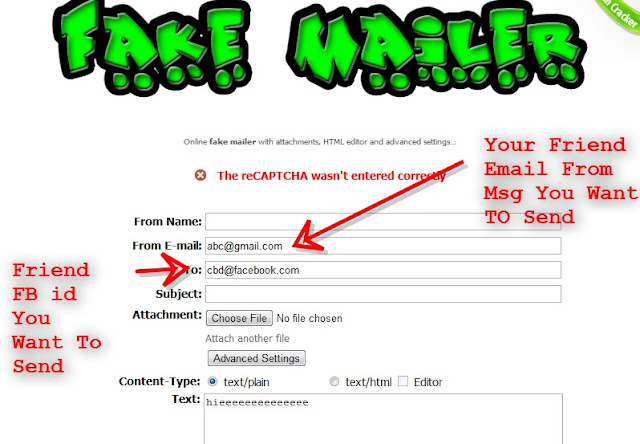
Facebook Trick 2013 Fake Msg Send From Friend Account

Now send MSG from any Facebook account to any account
this trick for fun:D

Its so simple method

No need any tool or knowledge of scripting
its very easy


1> go here http://emkei.cz/

2> Now put email id gmail,yahoo or any id of your friend want to
send MSG from his or her account


3> Now put Facebook email id of friend you want to send msg

example:- abc@facebook.com

this you easily find on profile link

4> Type MSG u want to send

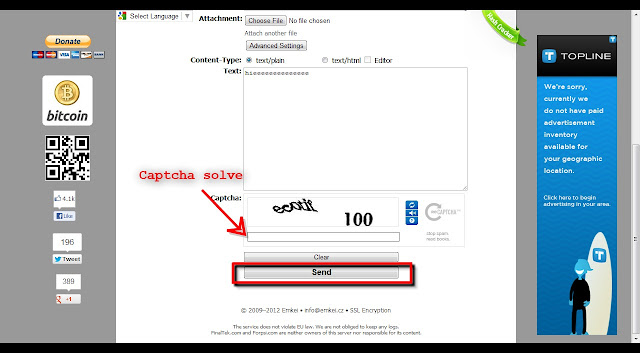
5> Type captch

And click send

You done :D

Try this with your fake accounts

Access Social Networking Sites For Free-Facebook,Twitter

Today I am going to give you information on two cool mobile apps using
which you can do something unimaginable. We know that all of us like
to spend some part of our time in social networking like twitter,
facebook or google something up. But given the high data costs and the
dearth of tricks in many networks we often are forced to limit our
adventures. However today I give you two options to access free social
networking. Well not free but its as good as free. Most of us have one or the other sms plans loaded on our mobiles. Imagine using those packs to communicate in orkut or facebook. That's just the idea behind this venture. Somebody has truly said that an idea can change your life...


SMS TWEET
& SHORTHAND


For using sms tweet first you have to register your mobile phone
number with the website. After successful registration it will connect
your twitter account with their server. You can start posting your
tweets by sending the message as formatted below to the number+919243000111 TWT (space) content of the tweet #

Shorthand browser is an all-in- one mobile application which gives
you unlimited access to facebook, google etc on your phone without
gprs costs(only messaging costs) . This app may make you think they
use data but by good fortune they do not. All web sites like facebook,
google are bundled within one fabulous mobile application. Shorthand.
Using shorthand you can access the following websites.

Orkut
Facebook
Google - maps, cricket, horoscope, news ...
Twitter
Wikipedia and I suppose some more.. This is available for free download at getjar, mobile 9 and reliance app store. As of now its also spotted on the indiatimes website for
free download.


Simple Facebook Hack To Make Status Update In Blue

 
This is the easiest hack around for facebook. Simply copy paste this code into your facebook status and enjoy...


@@[0:[100001152578980:0:your text]]


Example:
@@[0:[100001152578980:0:allyouhack.blogspot.com rocks!!]]

How To Find That A Facebook ID Is Fake Or Real ? Ultimate trick

Hey Guys , As you all know that millions of Facebook Ids are fake and this number is increasing day by day . Suppose you got a friend request of someone with a very sexy profile pic of a girl , and you acccept her request immediately and start chatting with her . But do you really believe that the indicated profile pic is original or its just fake ??
Here we present an ultimate trick to find that a Facebook ID is fake or real.
The trick is very simple . As most of you don't know that Google have launched its service of "Search By Image" . Our trick depends on this only.

Follow theses steps -

1. Suppose a Facebook ID is XYZ . Save his/her profile pic on your desktop .

2. Now Open Google Image On Your Browser By Clicking HERE .


3. Now Drag The Photo Of Your Victim And Leave It On The Search Tab .


 4. Let It Upload .


5. Now You Will See The Search Result. If The Image Is Available in The Search Result In Some Other Website Or Some Other Facebook ID Then Its A Fake ID.


Wednesday, 23 October 2013

How To Create FB Id Card

First go to Click Here


Subscribe to our Newsletter

Contact our Support

Email : ajai199@gmail.com